

OpenAI
OpenAI project service accounts let your application call the OpenAI API using a single key. It is an easy way to add functionality to your app; however, if you lose the key, it's also an easy way to leak sensitive information and rack-up fraudulent charges.
Requirements
- Understand the Doppler rotation methodology
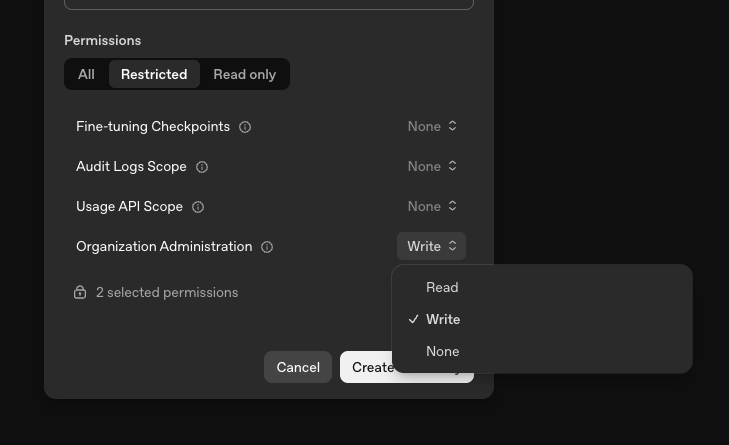
- Ability to create an OpenAI admin key with the following permissions
- Organization Administration set to Write (the
api.management.writescope)
- Organization Administration set to Write (the
- An OpenAI project to create service accounts in
Overview
Doppler rotates OpenAI keys using our issuer methodology. After you complete the rotated secret creation process, Doppler will create the first rotated secret instance. At the defined frequency, Doppler will then issue a new OpenAI service account instance before deleting a previous one (reminder: there's always two).
Doppler uses an OpenAI admin key as the managing user to create and delete project service accounts on your behalf. Each rotation creates a new service account within your selected project and injects its API key, then deletes the previous service account to revoke its key.
OpenAI project service account keys have full read and write access to the project's API resources and cannot be limited to a subset of scopes. The OpenAI project you select is the boundary for what a rotated key can access.
Privilege Scoping
When creating the admin key, you can use All permissions or a Restricted key, as long as Organization Administration is set to Write.
The admin key needs the Organization Administration permission set to Write (the
api.management.writescope) so it can create and delete the project service accounts it rotates.
OpenAI Rotated Secret Creation
- Navigate to the Doppler config you would like to add a rotated secret to
- Click the dropdown next to Add Secret and select Add Rotated Secret
- In the modal, select OpenAI
- Name your connection and provide your OpenAI admin key
- Select the OpenAI project you would like Doppler to create service accounts in
- Name your rotated secret. As you do, you'll get a live look at the three secrets we'll be dynamically injecting into your config.
- Select the interval at which you'd like your rotated secret instances to be rotated
- Hit Next
The setup is complete and Doppler has created the first rotated secret instance, which is immediately available in your config.
Updated about 2 months ago